• Products
    • Phone OrdersFreeYour menu, one link and a QR code.
    • POS ModePOSTill, kitchen and tables. Works offline.
    • Store DashboardOperationsStock, cost per dish, real profit.
    • Claude connectorAsk Claude about your numbers (Beta)
    See all products →
  • Pricing
  • Free tools

    • Delivery commission calculator
    • Recipe cost calculator
    • Free QR code menu

    Learn and get help

    • Blog
    • Docs & Help
    • Compare
    • Changelog
    • Contact
EN
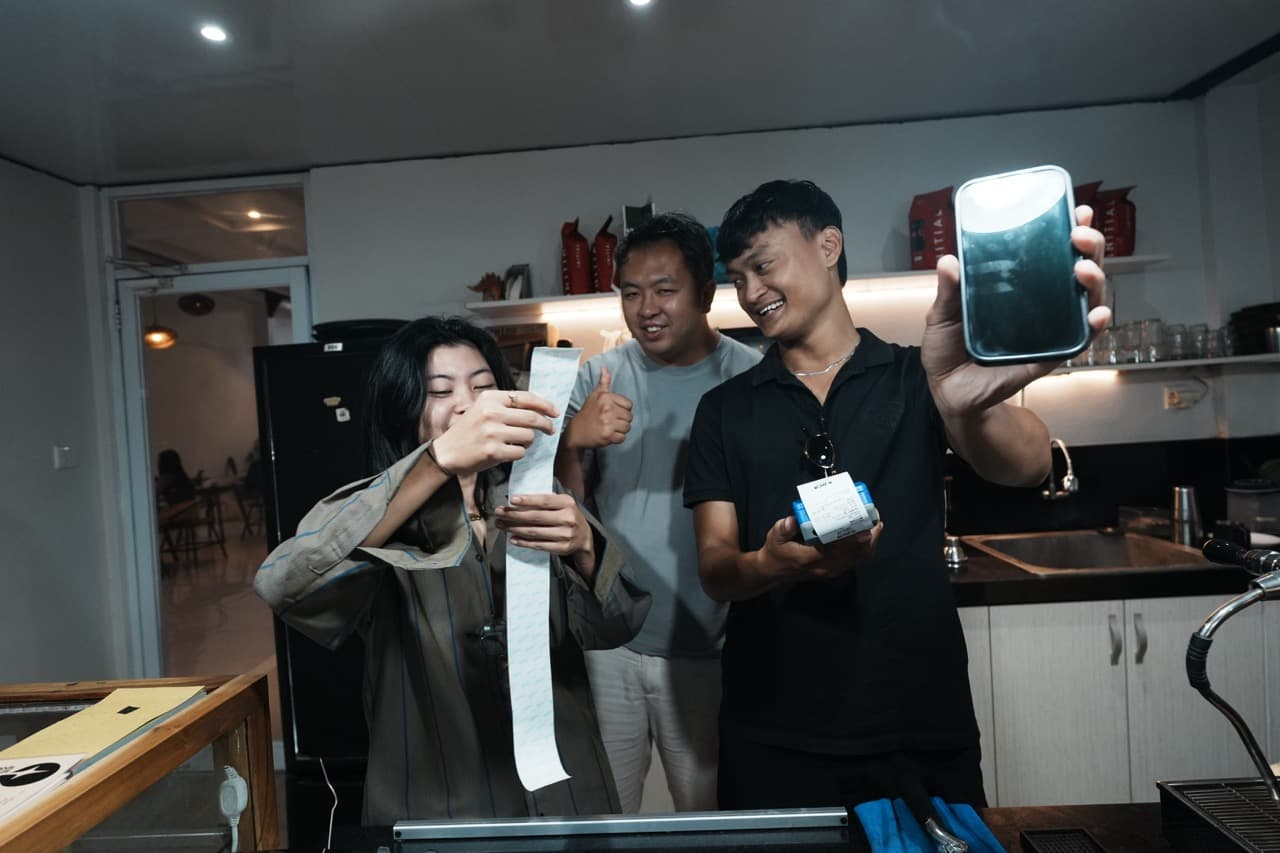
Three café staff laughing behind the counter: one holds a long printed receipt, another shows a phone and a small receipt printer.

Online ordering + POS for cafés

Customers order on their phone, you get paid

Your free link: epidom.fr/@your-cafe

Start the 14-day POS trialNo card needed

Bio-link, orders, stock, staff and finance in one link.The end-⁠to-⁠end ordering system for cafés, restaurants, and bakeries: bio-⁠link, orders, stocks, staff operations to finance in a single website link (epidom.fr).

24h online support
Last updated
Nov 11, 2026

Trusted by 12 cafés, bakeries & restaurants

  • Abenz Coffee & Eatery
  • Lorette
  • Kalve
  • Tahoma
  • Hygge Caffe
  • Utopie
  • Stradina
  • Cuvée Noire
  • Casacosa
  • Roberta Caffè
  • Mian Fan
  • La Pause Libanaise
Made for food & drink

What is Epidom used for?

One link, one till and one store dashboard, set up for the way your kind of business runs.

Let regulars order from their phone and skip the queue

  • A fast till built for the morning rush
  • Know your cost per cup, milk included
  • Keep selling when the Wi-Fi drops
Start free trialRead the café guide →
One app · three platforms

One link, 3 devices connected

No extra hardware needed.
  1. Latte+Burger+Soda+

    Step 01

    Free

    Phone Orders

    Your menu, one link and a QR code.

    No login, live demo →
  2. Printed in kitchenOffline, still selling

    Step 02

    POS

    POS Mode

    Till, kitchen and tables. Works offline.

    Open live demo →
  3. Real profit · today

    $1,240

    Oat milk · running low

    Step 03

    Operations

    Store Dashboard

    Stock, cost per dish, real profit.

    Open live demo →

All running·Connect Claude MCP

POS Mode, up close

The till your team works on

Real Epidom screens, not mockups. Five reasons owners switch, in the order they matter.

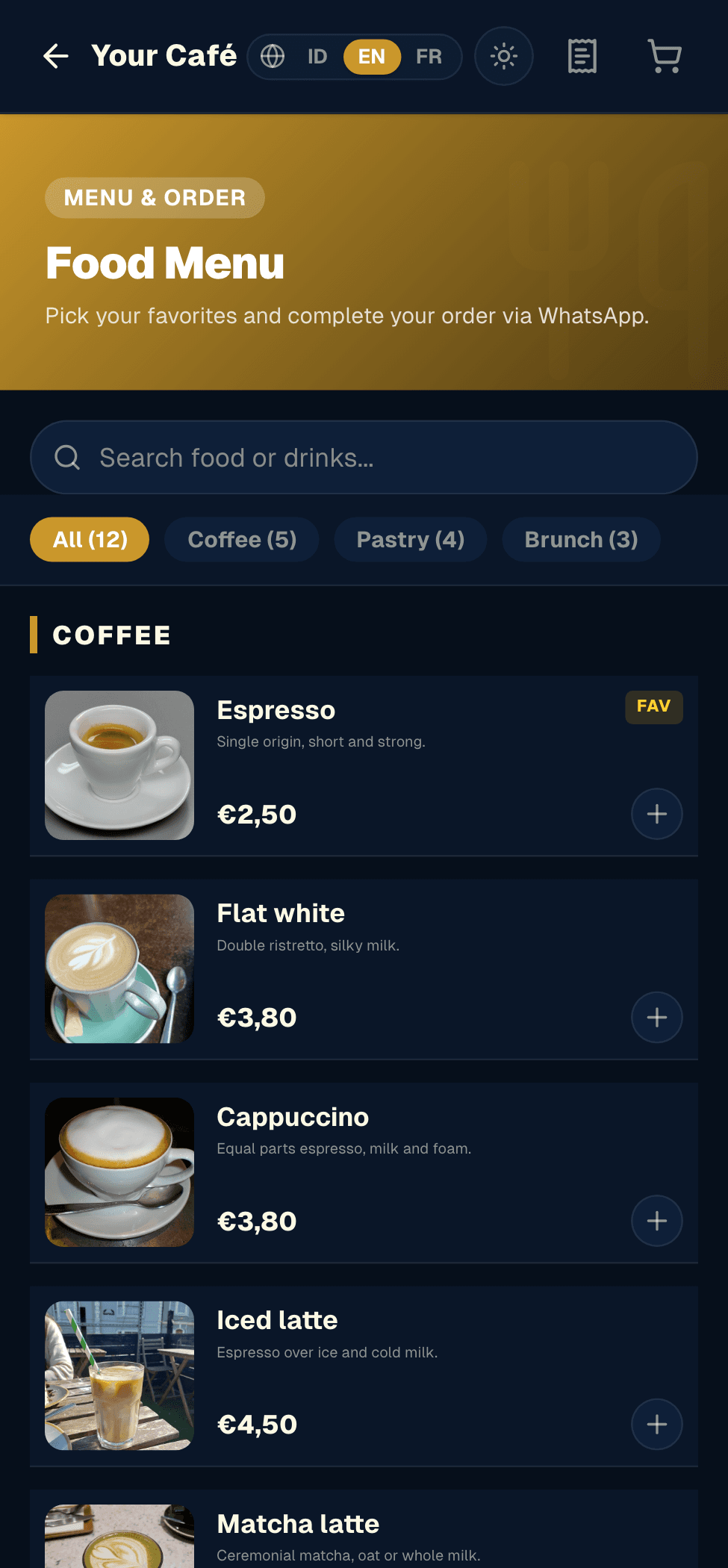
Customers order from your link and pay at the counter. The order lands in the same queue as the till: no missed calls, no double entry, no wrong orders.

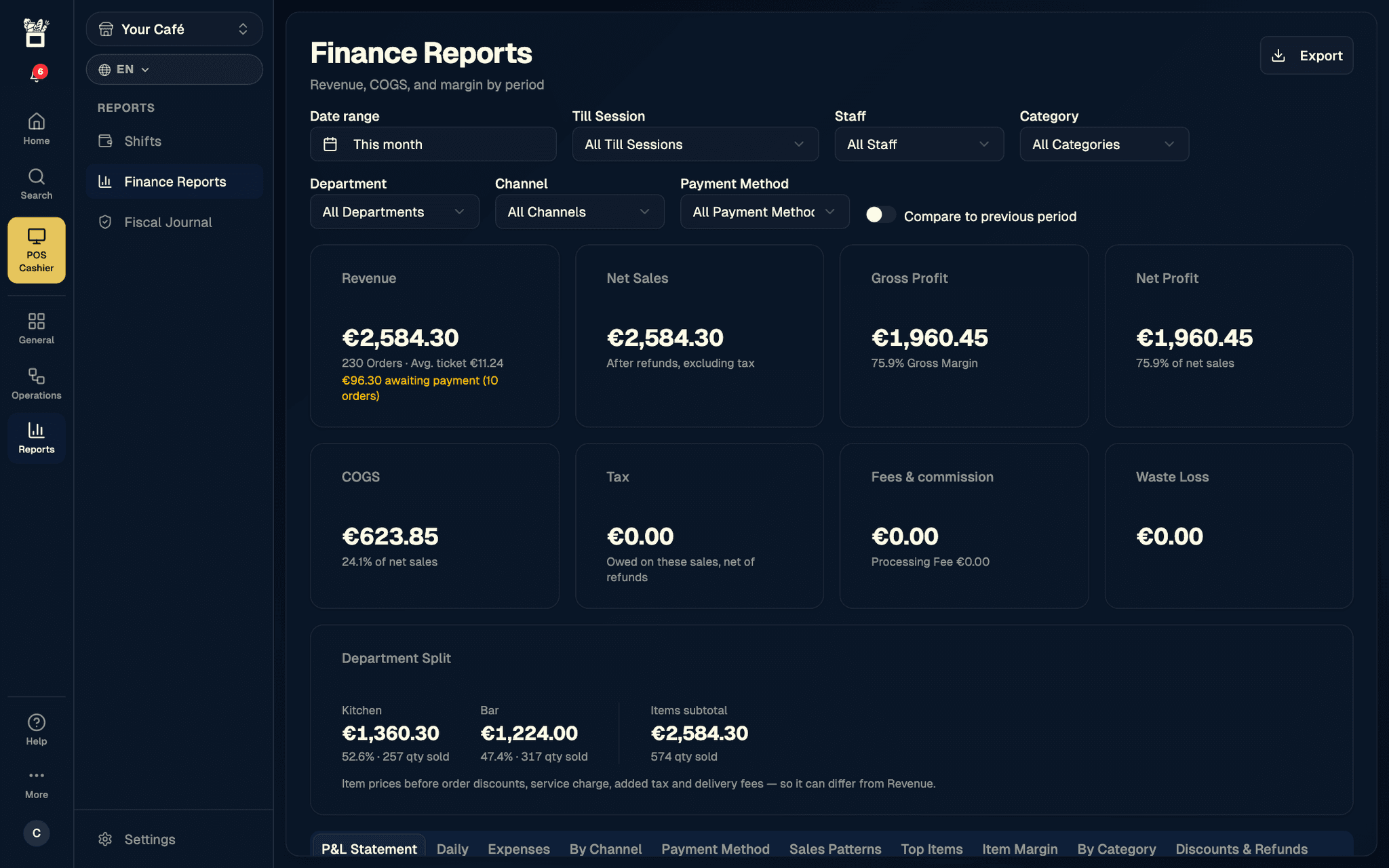
Every sale, refund and cost feeds live reports: P&L, margin per item, by shift, by channel, tax and labour. From the Operations plan, ask Claude about your numbers in plain words (Beta).

Import your menu and past data from your old POS. Epidom reads the file and sorts each row itself, so there is nothing to retype and no day lost.

Open Epidom in any browser, add it to the home screen and it runs full screen, with one login on phone, tablet or computer. Nothing to download, nothing to update.

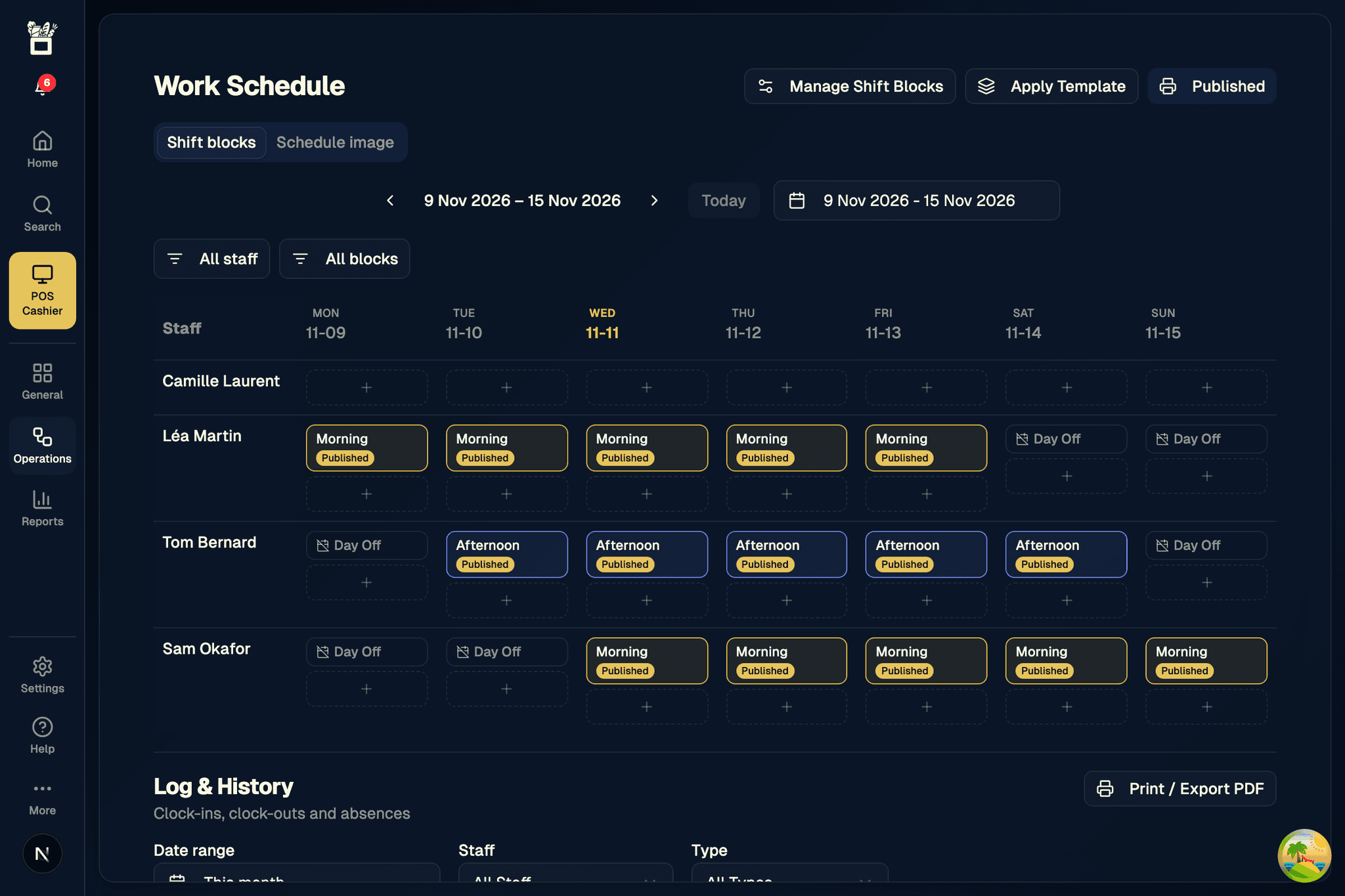
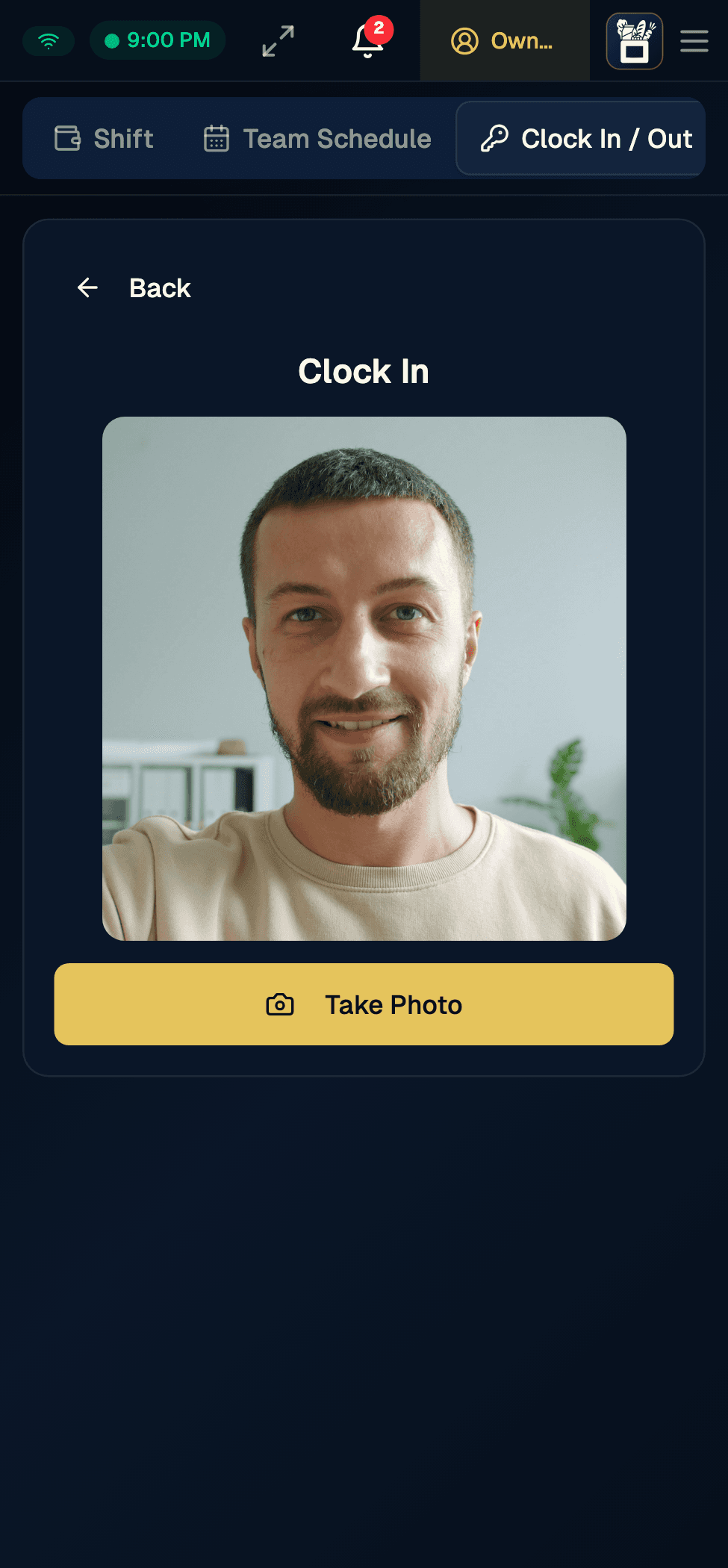
Build the weekly roster from shift blocks, then staff clock in and out from the till with a selfie. See who is on shift, the hours worked against the roster, and approve overtime.

A café's Phone Orders page on a phone: Coffee, Pastry and Brunch categories, items with their prices and an add button.
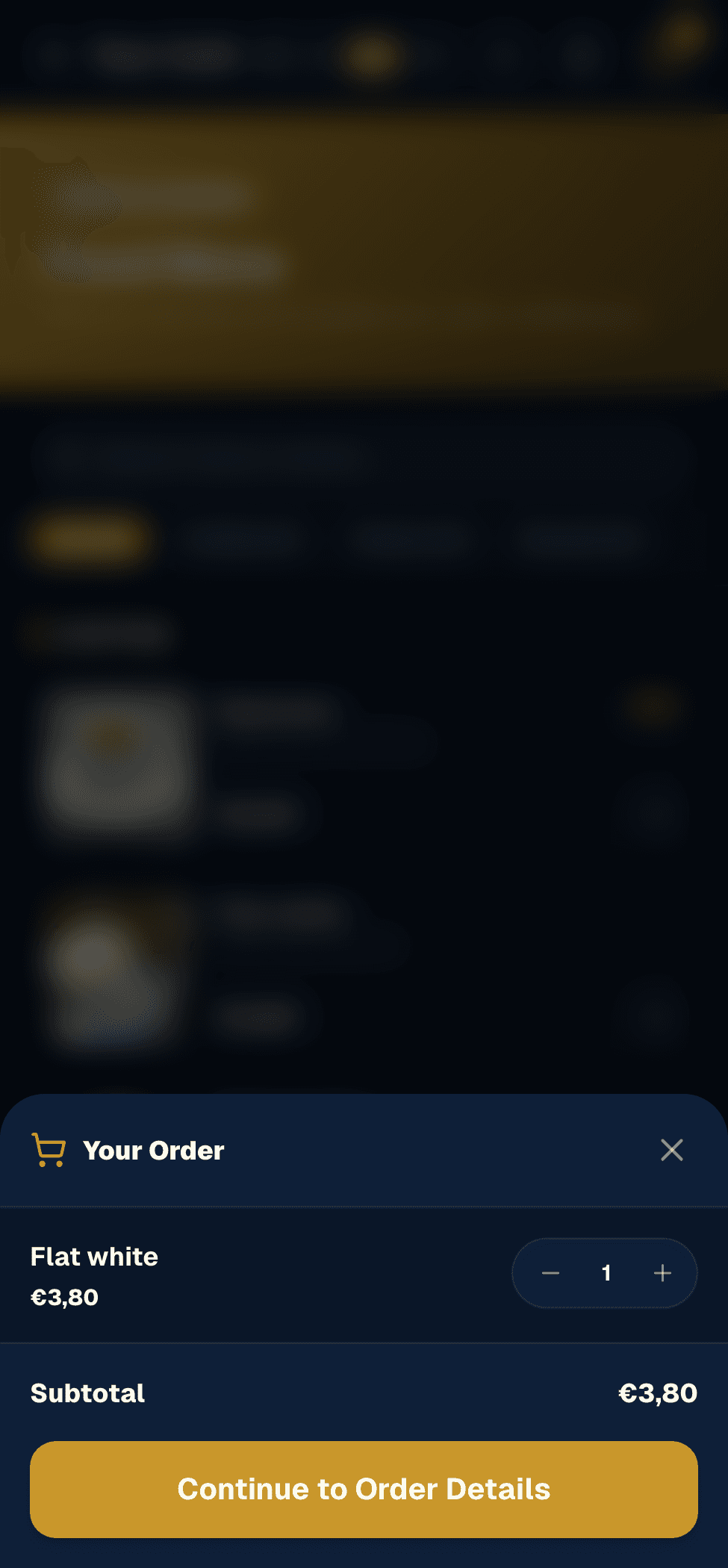
The cart when ordering from a phone: the chosen item, its quantity, the subtotal and the button to continue to the order details.
The Store Dashboard finance reports: €2,584.30 revenue from 230 orders, net sales, a 75.9% gross margin, net profit, cost of goods, tax, fees and waste.
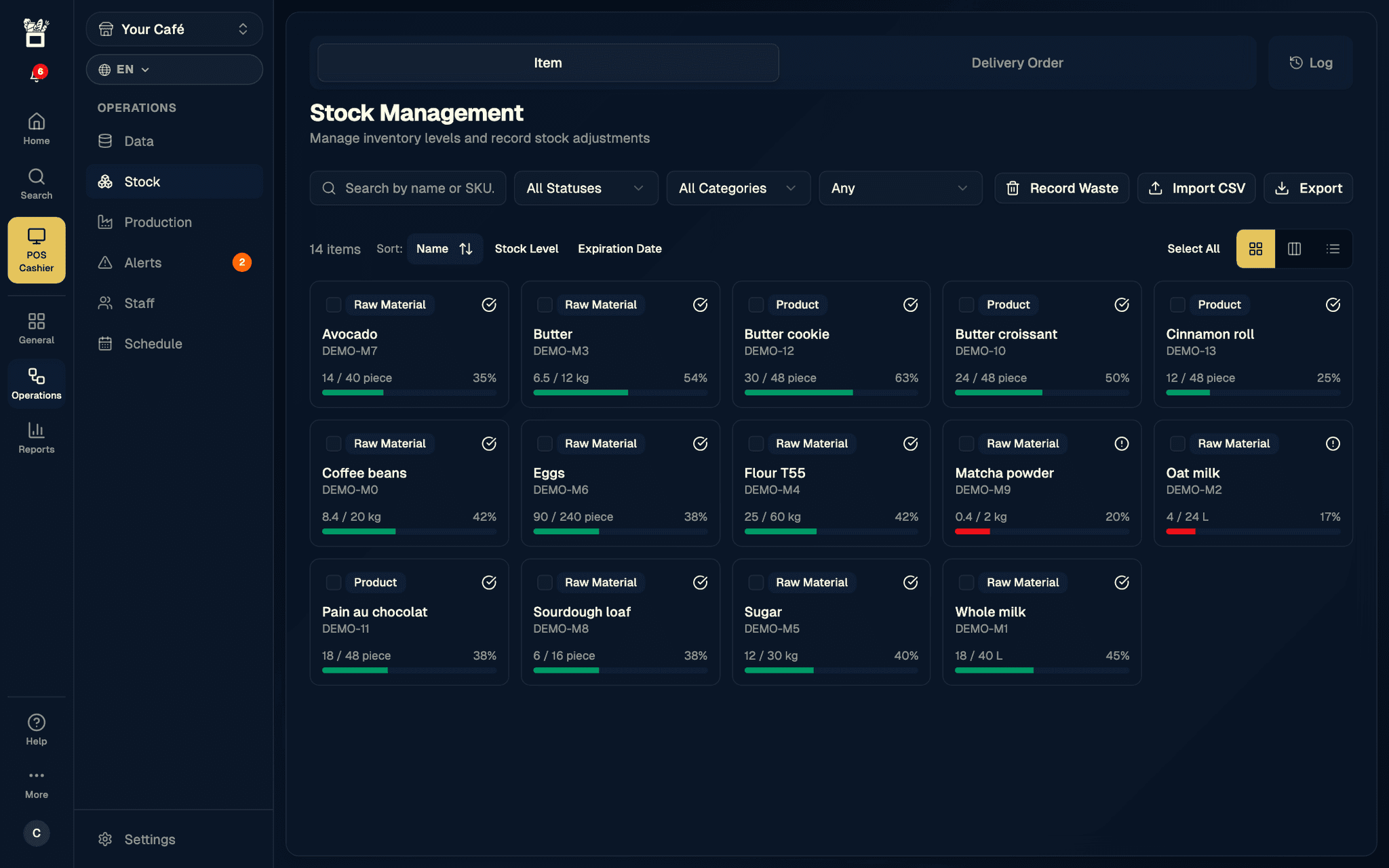
The Store Dashboard stock page: 14 items with their level as a bar, two in red below their minimum (matcha powder, oat milk).
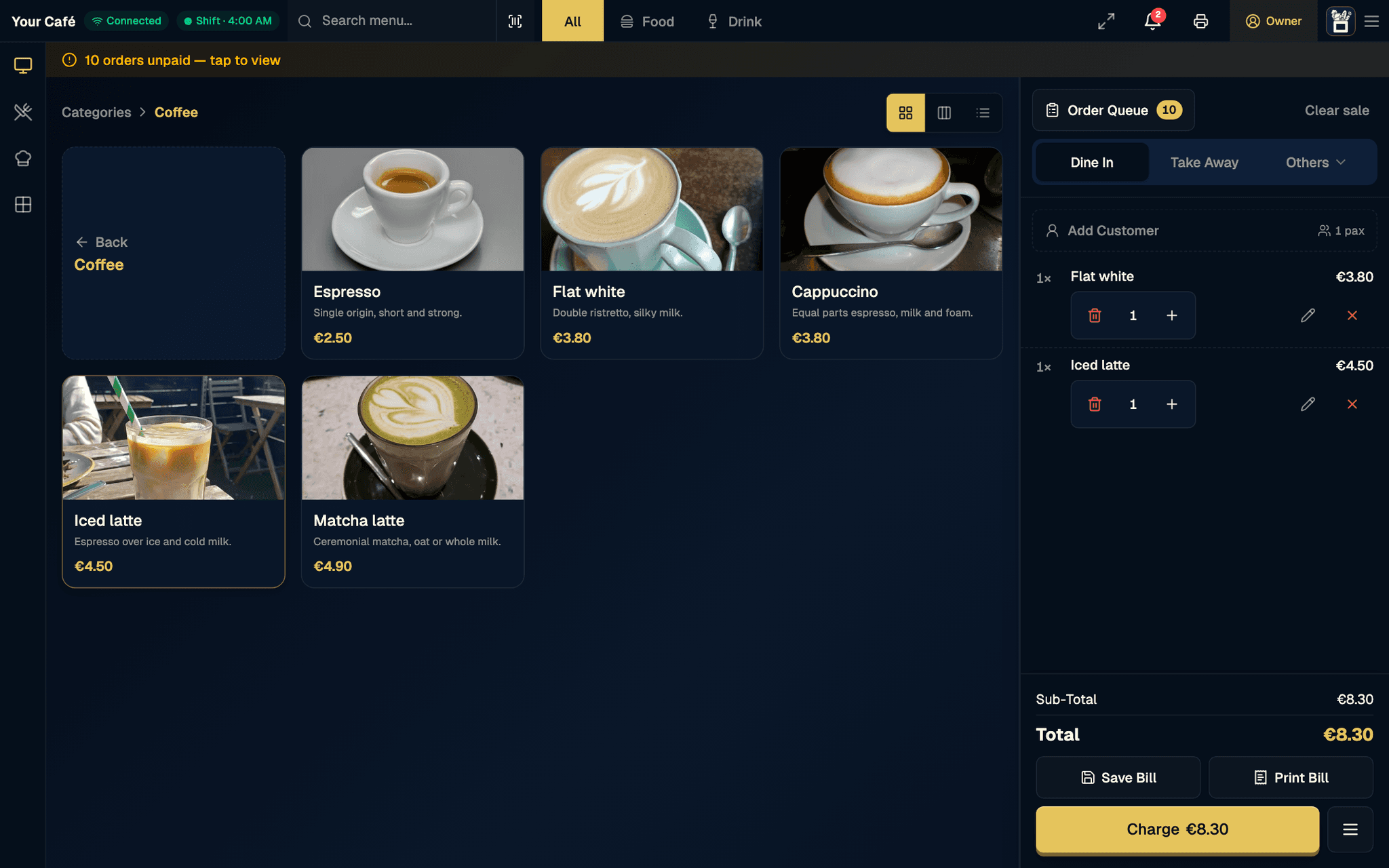
Epidom's POS cashier: the Coffee category on the left and, on the right, the current dine-in bill with a flat white and an iced latte, an €8.30 total, and Save Bill, Print Bill and Charge buttons.
The Store Dashboard work schedule: the week of 9 to 15 November by person, with published Morning and Afternoon shift blocks and days off.
The POS Clock In screen on a phone: the camera preview and a Take Photo button for the arrival selfie.
Calculator

How much is your current setup costing you?

Your numbers, not ours. Nothing is saved.

Compare with popular POS apps
Currency
$
$
%
%
20%
$
%
Epidom plan

Online ordering is part of the POS plan. The Free plan shows your menu but takes no orders, so it would not change your commissions.

You pay about $2,250 a month in commissions.

Saving per month
$371
Per year
$4,453

Your margin goes from 3% to 4.2%.

Today3%
With Epidom4.2%
  • Assumption: payment fees of 2.9% + $0.30 per direct order.
  • POS plan price deducted: $14.99 a month.
Start saving

Estimate based on your numbers. Real results vary.

Plans

Start free, no commitment

  • Free

    $0
    forever

    Your storefront and its QR code, forever.

    Create my page
  • POS

    Most popular
    $14.99
    per month

    Till, online ordering, kitchen screen, tables. 14 days free.

    Try 14 days

    No card needed

  • Operations

    $29.99
    per month

    Stock, recipes, finance, up to 3 outlets.

    See the plan
  • Enterprise

    Custom
    for your project

    4+ outlets, custom builds.

    Talk on WhatsApp

No commitment. Cancel anytime.

See the full comparison →
FAQ

Questions we get a lot.

and a few we wish people asked.

Still wondering? Talk to us:

  • WhatsApp · France France
  • WhatsApp · Indonesia Indonesia
  • support@epidom.fr

24h online support · by WhatsApp

Free to start. The menu page and QR code are free forever. POS is $14.99 a month ($12.49 a month billed yearly) and Operations is $29.99 ($24.99), before tax. Operations covers up to 3 outlets; chains of 4 or more get Enterprise, priced with you. POS is free for 14 days, no card needed.

Compare all plans →

No. Start with the free storefront next to your till: your menu online and its QR code. Online ordering comes with the POS plan, and you keep your till for as long as you like.

Yes. Import a spreadsheet or CSV from your old till: Epidom reads the file and sorts each row itself, so there is nothing to retype. Your link and QR code are live as soon as you publish, and the live demo needs no login.

At your counter. Customers order from their phone and the order reaches your till and kitchen screen unpaid; your cashier takes the payment and taps Mark as Paid. The till records cash, card, bank transfer and QRIS, and the customer's screen shows your QRIS code with the amount.

You keep selling. POS Mode records new sales on the device and sends them as soon as the connection is back. Each sale keeps the time it was rung up, so it lands on the right day and shift. A few things, like customer lookup and refunds, need the connection.

How offline mode works →

No. A tablet, phone or computer with a browser is enough. Bluetooth receipt printers work on Android and on a computer; on iPad, printing goes through the browser.

Yes, it's your data. From the Store Dashboard, customers export from the POS plan; products, ingredients, recipes, suppliers and financial reports with the Operations plan, as CSV or Excel, whenever you want.

The trial is on the POS plan, for an account's first subscription, and needs no card. To keep POS after the 14 days, add a card in Billing: it is first charged when the trial ends. Without a card your account goes back to the Free plan, and your menu, orders and staff stay.

Yes, from the Operations plan (Beta). Connect Epidom to Claude and ask in plain words: yesterday's sales, what is running low, this week's margin, who is on the roster. Claude reads your data; on Enterprise it can also make changes, always with your approval.

How the Claude connector works →

Yes, on the Operations plan. Each person gets a role and a PIN, you publish the weekly roster, and staff clock in with a selfie and their location. You approve overtime, and the hours feed payroll against the roster.

Start the 14-day POS trialNo card needed

Start protecting your margin today.

Try the till for 14 days, or create your page for free.

Start 14-day POS trialTalk to us on WhatsApp
Create my free page
Start the 14-day POS trialNo card needed

Stay in the loop

Tips & updates for your coffee shop. No spam.

F&B Platform — Free, Complete, Fast

Product

  • Home
  • Products
  • Pricing
  • Compare
  • Contact
  • Docs & Help
  • Changelog

Guides & tools

  • Recipe cost calculator
  • Delivery commission calculator
  • Free QR code menu
  • Commission-free online ordering
  • Cafe POS system
  • Bakery POS system
  • Offline POS
  • Kitchen display system
  • Restaurant inventory
  • Staff scheduling
  • Receipt printers
  • Claude connector

Company

  • About
  • Blog
  • Careers
  • Press
  • Partners
  • Build your app

Legal

  • Terms of Service
  • Privacy Policy
  • Refund Policy
  • Cookie Policy
  • GDPR

Contact us

  • support@epidom.fr
  • WhatsApp France
  • WhatsApp Indonesia
  • Canggu, Bali
  • Meet us
  • Phone OrdersYour menu, one link and a QR code.
  • POS ModeTill, kitchen and tables. Works offline.
  • Store DashboardStock, cost per dish, real profit.

Your dream café, running on autopilot.

Infrastructured byPRIONATION.io
© 2026 Epidom. All rights reserved.v3.47.0
Terms of ServicePrivacy PolicyRefund Policyepidom.fr
FrançaisIndonesiaEnglish